🔐 Authentication
All API requests to API Data Tools must be authenticated using an API key.
Authentication is handled via a custom HTTP header:
x-api-key: YOUR_API_KEY
🚀 Getting Your API Key
- Sign up at https://www.apidatatools.com
- Navigate to your dashboard
- Generate a new API key
- Copy and store it securely
⚠️ Treat your API key like a password. Do not expose it in frontend code or public repositories.
📌 How Authentication Works
Every request must include the x-api-key header.
If the key is:
- ✅ Valid → Request is processed
- ❌ Missing → Request is rejected
- ❌ Invalid → Request is rejected
- ⛔ Rate-limited → Request is throttled
📥 Example Request (cURL)
curl -X POST https://api.apidatatools.com/json-formatter-api \
    -H "Content-Type: application/json" \
    -H "x-tab-space: 2" \
    -H "x-source-type: body" \
    -H "x-api-key: <api_key>" \
    -d '{"content":"{\"name\":\"John\"}"}'
💻 Example Request (JavaScript)
fetch("https://api.apidatatools.com/json-formatter-api", {
    method: "POST",
    headers: {
    "Content-Type": "application/json",
    "x-api-key": "<api_key>",
    "x-tab-space": "2",
    "x-source-type": "body"
    },
    body: JSON.stringify({
    content: '{"name":"John"}'
    })
})
.then(response => response.json())
.then(data => console.log(data))
.catch(error => console.error('Error:', error));
🐍 Example Request (Python)
import requests

url = "https://api.apidatatools.com/json-formatter-api"
headers = {
    "Content-Type": "application/json",
    "x-api-key": "<api_key>",
    "x-tab-space": "2",
    "x-source-type": "body"
}
payload = {
    "content": '{"name":"John"}'
}

response = requests.post(url, json=payload, headers=headers)

print(response.json())
🧪 Postman Example (JSON Formatter API)
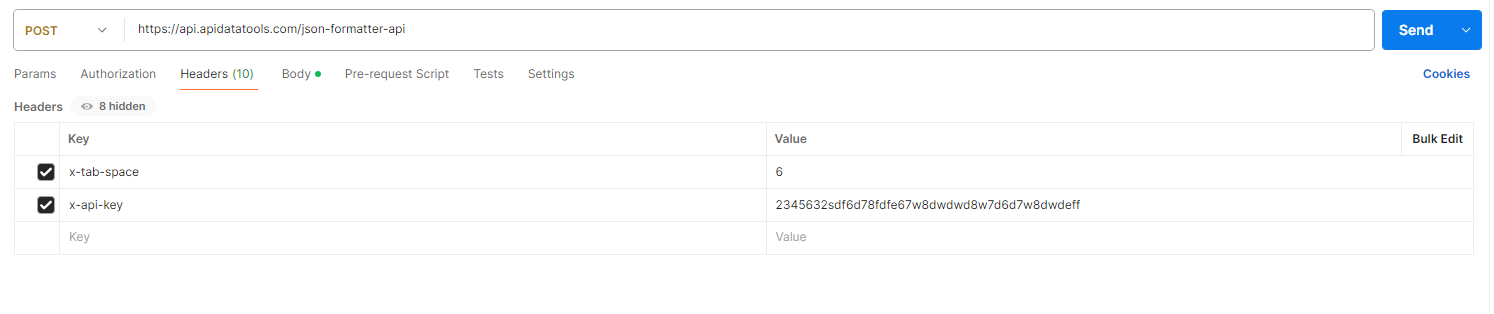
Setup in Postman:
- Method: POST
- URL:
https://api.apidatatools.com/json-formatter-api
Headers:
| Key | Value |
|---|---|
| Content-Type | application/json |
| x-api-key | YOUR_API_KEY |
| x-tab-space | 2 |
Body (raw → JSON):
{
  "name":"John",
  "age":30
}
✅ Successful Response
{
    "status": "success",
    "file": "https://downloads.apidatatools.com/apidatatools_convert_ae72ef95867018093aee16fec4998e72.json",
    "preview": "{\n      \"name\": \"John\",\n      \"age\": 30\n}"
}
❌ Authentication Errors
1. Missing API Key
{
    "message": "Forbidden"
}
2. Invalid API Key
{
    "message": "Forbidden"
}
3. Rate Limit Exceeded
{
  "status": "error",
  "error": "TOO_MANY_REQUESTS",
  "details": {
    "message": "Rate Limit Exceeded. Please try again later."
  }
}
🔒 Security Best Practices
✅ Do
- Store API keys in environment variables
- Rotate keys periodically
- Use backend servers to make API calls
- Monitor usage
❌ Don’t
- Expose API keys in frontend JavaScript
- Commit keys to GitHub
- Share keys publicly
🧠 Advanced Notes
- API keys are scoped per user/project
- All requests are logged with a
request_id - You can track usage and errors via your dashboard
- Rate limits depend on your plan
📞 Need Help?
If you're facing authentication issues or need higher limits, contact support.